[7/6] Claude Code: From Vibe Coding to Spec-Driven Development

This is an extended chapter to the 6-part Claude Code series. The first six chapters documented building a full-stack Finance app using Vibe Coding. This chapter covers what came next.
The first six chapters documented the complete journey of using Claude Code for Vibe Coding — building a full-stack application from scratch and accumulating 40,000 lines of code. Vibe Coding delivered incredible speed, but as the project grew, a structural problem emerged:
AI writes code fast. AI also goes off-track fast.
When you describe a requirement in one sentence, AI might understand 70% of it and then sprint full-speed in that direction for two hours — only for you to realize the core logic is wrong and have to start over.
This isn't theoretical. Before adopting SDD, my real pain points in the Finance project were:
- Unstructured workflow: I had to remind AI to organize requirements before writing code, otherwise it jumped straight to implementation
- Missing design documentation: architectural issues only surfaced after implementation, making course corrections expensive
- Inconsistent code quality: the same requirement could produce wildly different code quality across sessions
- Tests routinely skipped: Vibe Coding tends toward "get it running first," making tests optional
- Slow debugging: without clear task boundaries, bugs were hard to locate and back-and-forth with AI was inefficient
This chapter documents a methodology upgrade experiment: introducing Spec-Driven Development (SDD) into the Finance project using OpenSpec, completing three new features, and comparing results against prior Vibe Coding work.
What is Spec-Driven Development
Core Idea
The core principle of Spec-Driven Development is: reach consensus before writing code.
In traditional Vibe Coding, the flow is:
Idea → One-liner prompt → AI starts coding → Iterate as you go
In SDD, the flow is:
Idea → Structured proposal → Task checklist → AI implements by checklist → Archive spec
The difference isn't the tooling — it's when decisions are made. SDD forces all important decisions (feature scope, technical approach, acceptance criteria) to happen before coding begins, locking them into documents that constrain the AI to execute within a well-defined space.
What is OpenSpec
OpenSpec is a lightweight AI workflow CLI tool designed specifically for SDD. Its core is a standardized project structure and three commands:
openspec/
├── specs/           # Current full spec (source of truth)
│   └── <capability>/
│       └── spec.md
└── changes/         # In-progress changes
    ├── <change-id>/
    │   ├── proposal.md   # Why, what, and scope of the change
    │   ├── design.md     # Technical approach
    │   ├── tasks.md      # Decomposed implementation checklist
    │   └── specs/        # Delta spec (additions/modifications only)
    └── archive/          # Completed and archived changes
Installation and setup:
npm install -g @fission-ai/openspec@latest
openspec --version

cd your-project
openspec init
The Three-Phase OpenSpec Workflow
┌─────────────┐     ┌─────────────┐     ┌─────────────┐
│   PROPOSE   │────▶│    APPLY    │────▶│   ARCHIVE   │
│             │     │             │     │             │
│ proposal.md │     │ tasks.md    │     │ specs/ sync │
│ design.md   │     │ [x] task 1  │     │ change →    │
│ tasks.md    │     │ [x] task 2  │     │  archive/   │
│ specs/delta │     │ [ ] task 3  │     │             │
└─────────────┘     └─────────────┘     └─────────────┘
  Align upfront       Implement           Lock in spec
OpenSpec is used in Claude Code as three Skills:
Phase 1: /opsx:propose
Input: A one-sentence description or draft requirement
Output: proposal.md (Why/What/Scope), design.md (technical approach), tasks.md (decomposed task checklist), specs/ (delta spec)
This phase transforms a vague idea into an executable contract. AI plays the role of architect and product manager; you play the reviewer.
Key action: Review tasks.md — check that task decomposition is reasonable and acceptance criteria are clear. Fixing issues here is far cheaper than tearing things apart mid-implementation.
Phase 2: /opsx:apply
Input: Reviewed and approved tasks.md
Output: Code, tests, and configuration changes implemented item by item
AI executes tasks in order, marking each [x] on completion. You can pause at any point, review progress, correct direction, and resume.
Key action: Don't insert new requirements during implementation. If requirements change, update the proposal first, then resume apply — that's SDD discipline.
Phase 3: /opsx:archive
Input: Completed change directory
Output: Delta spec merged back into openspec/specs/, change directory moved to archive/
Archiving keeps the spec library (specs/) always representing "the current state of the system," becoming the starting point for the next change.
config.yaml: OpenSpec's "Project Memory"
After completing the first feature, I realized I'd skipped an important setup step: configuring openspec/config.yaml. Ideally this should be done before the first feature, but better late than never — starting from the second feature, it began paying dividends.
This file is OpenSpec's equivalent of CLAUDE.md — it tells AI about the project's tech stack, coding conventions, and historical mistakes to avoid.
Initializing config.yaml:
Please update the config.yaml under the openspec directory. Refer to the root CLAUDE.md
for tech stack, conventions, and code style guidelines. Refer to README.md for domain
knowledge. Use the example format provided in the config.yaml file.
After AI generated the initial version, I made two targeted additions:
Adding a testing strategy:
Please add a testing strategy to config.yaml. This is a full-stack application —
testing should cover both backend API testing and frontend UI testing.
Documenting historical mistakes (to prevent recurrence):
When developing the runway feature with OpenSpec, two mistakes were made:
1. Currency was ignored — account amounts were summed directly without conversion
2. The fix introduced a performance issue — exchange rates were queried from DB
   per record, when the Controller layer already has a cached ExchangeRateService

Please add these to config.yaml so future changes avoid repeating them.
config.yaml isn't a one-time setup — it's an ever-growing error prevention manual. Each new mistake gets added, and AI proactively avoids it in every subsequent change.
Three Features in Practice
Feature 1: Runway Analysis
Requirement: Based on current liquid assets and projected monthly expenses, calculate how long the family's funds will last.
Propose:
I want to add a new function, runway analysis. I have one example at C:\...\runway-calculation,
please use the same structure. You can get future monthly expenses from the system,
and liquid assets from the system. Please create a proposal.
AI generated a checklist of 27 tasks covering backend API, frontend pages, and tests — with only one manual task (testing via Swagger UI).
Problems discovered during Apply:
Issue 1 (critical bug): Currency not aligned
The initial implementation simply summed all account balances, ignoring multi-currency — a USD account and a CNY account added directly, producing completely wrong results.
Root cause: this was a business understanding problem, not a technical one. AI writes code quickly but doesn't spontaneously "think about" the need for currency conversion.
After fixing that, a second problem appeared:
Issue 2 (performance bug): Every exchange rate lookup hit the database
When fixing the currency issue, AI queried the database for exchange rates on every single record, making report generation extremely slow. The system already had a cached ExchangeRateService that only needed to be called once.
Both bugs were fixed quickly after pointing them out — but more importantly: both were written into config.yaml, protecting all future changes from repeating them.
After Runway Analysis was complete, requirements expanded: adding the ability to exclude specific liquid assets and adjust individual expense items — normal in SDD, completed by updating the proposal and continuing apply.
Stats:
- Code added: ~1,900 lines, 18 files
- Tasks completed: 26/27 (1 manual)
- Development time: ~2 hours
Feature 2: Runway Report Persistence and PDF Export
Requirement: The Runway page recalculates from scratch every time it opens. There's no way to save a snapshot for later review.
How SDD handles requirement changes:
This feature went through three requirement changes — a good test of SDD's flexibility:
Initial: Export JSON file to local disk
↓ User found JSON unfriendly
Change 1: Export as PDF report instead
↓ User changed mind, didn't want local-only storage
Change 2: Persist to backend database, add report list page
The third change was the most significant — requirements shifted from "pure frontend" to "full-stack with new database table."
Key decision: OpenSpec detected the large scope change and deleted the already-generated proposal and tasks to regenerate from scratch.
This is SDD discipline: don't patch a half-baked proposal — when requirements change significantly, re-propose. Experience proved this right — in prior Vibe Coding work, piecemeal modifications to half-formed requirements consistently confused AI and produced worse results.
The regenerated proposal produced 34 tasks across 11 categories (backend entity/Repository/Service/Controller, frontend components, database migration, backend tests, frontend tests).
Problems during Apply:
- API routing error: Save Report didn't work — diagnosis revealed a Controller routing misconfiguration. Added to config.yaml.
- PDF Chinese character corruption: The PDF library AI initially chose didn't support Chinese. Switching to a different implementation resolved it.
- Mock test failures: New mock testing framework had incorrect initial configuration; fixed based on error output.
Post-archive follow-up:
Test coverage was still weak (frontend UI tests were manual only). A dedicated Vitest + Vue Test Utils setup was done afterward:
# Install component testing framework
npm install -D vitest @vue/test-utils @vitejs/plugin-vue jsdom
# Update vite.config.js to configure test environment
Stats:
- Code added: ~1,800 lines, 25 files
- Tasks completed: 33/34
- Development time: ~38 minutes (from second proposal to archive)
Feature 3: Property Investment Calculator
Requirement: Convert an Excel spreadsheet ("The Brutal Calculator") into a native web calculator for Bay Area high-income earners to evaluate after-tax returns on rental property investments.
Propose:
I added an Excel file under the requirement folder (The Brutal Calculator.xlsx).
Please read the sheet and convert it as a new feature: Property Investment Calculator.
I may add a new group (投资/Investments) in the sidebar.
Reading the Excel file took some setup time (an xlsx parsing tool needed to be installed), but AI fully parsed all formula logic and generated:
- 8 task groups, 22 tasks
- Covering: Vue component, formula utilities, route registration, Sidebar changes, Vue component tests
This was the only purely frontend change among the three features — no backend changes, no database changes.
Problems during Apply:
- Formula calculation errors: PMT (mortgage payment) and CUMPRINC (principal paydown) were implemented incorrectly. Fixed after pointing it out. This type of error reflects AI's imperfect understanding of financial formulas, not a code capability issue.
Post-apply, some UI adjustments were made (2-column layout changed to 3-column, label display tweaks), all completing smoothly.
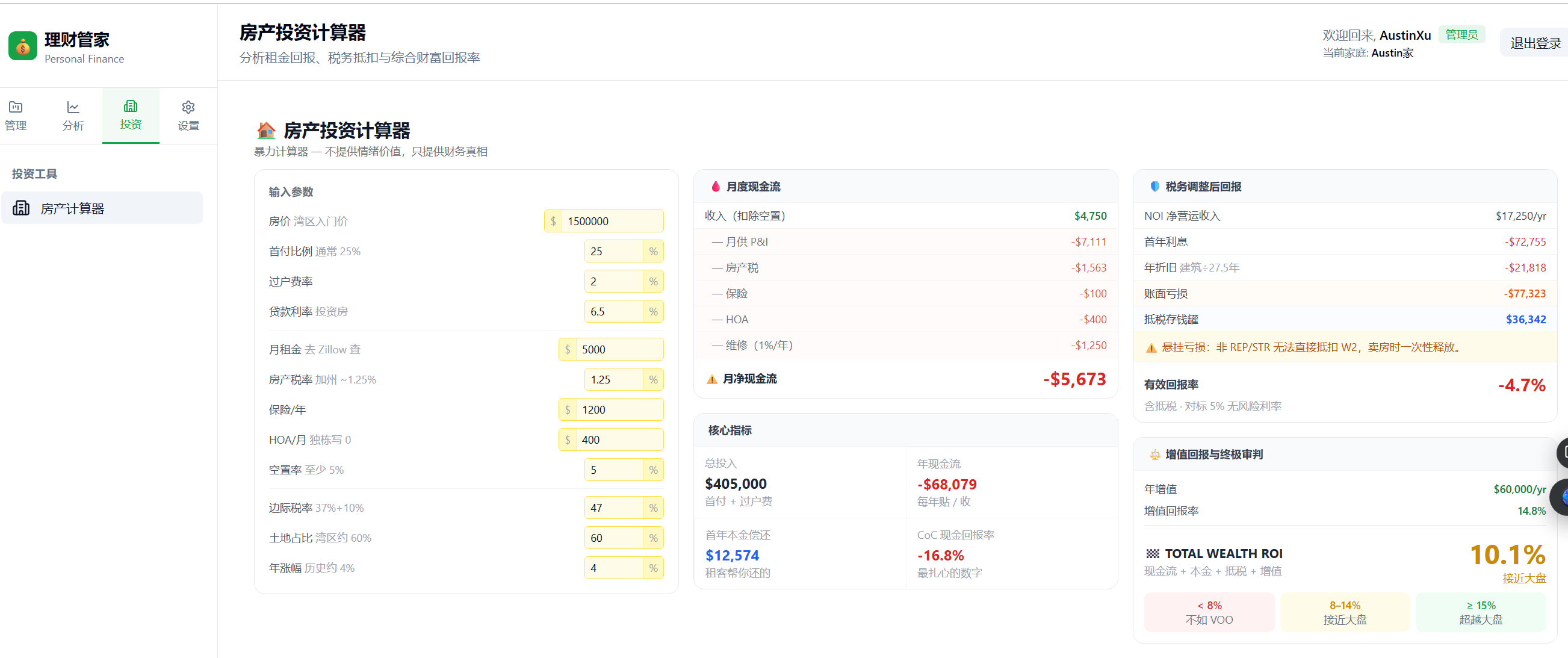
Figure: Property Investment Calculator — 13 editable inputs on the left, five real-time result panels on the right
Stats:
- Code added: ~2,400 lines, 22 files
- Tasks completed: 19/20 (task 20 was optional manual testing, verified by user)
- Development time: ~49 minutes
Side-by-Side Comparison
| runway-analysis | runway-report | property-calculator | |
|---|---|---|---|
| Code added | ~1,900 lines | ~1,800 lines | ~2,400 lines |
| Task count | 27 | 34 | 20 |
| Complexity | Full-stack, no new DB table | Full-stack + new DB table | Frontend only |
| Test coverage | Manual backend tests | Auto backend + manual frontend | Auto frontend + backend |
| Critical errors | Currency alignment, rate perf | API routing, PDF encoding | Financial formula errors |
| Dev time | ~2h | ~38m | ~49m |
Why were Features 2 and 3 so much faster than Feature 1?
It wasn't AI getting smarter. Three reasons:
- config.yaml accumulated lessons: The currency/exchange rate issues were written into config after Feature 1. Features 2 and 3 didn't repeat them.
- Test infrastructure was in place: Vitest was set up after Feature 1; subsequent features built on it directly.
- Clearer requirements: After the first feature, proposal descriptions became more precise, reducing AI's interpretation errors.
SDD vs. Vibe Coding: When to Use Which
| Dimension | Vibe Coding | Spec-Driven Development |
|---|---|---|
| Requirement clarity | Fuzzy is fine, define as you go | Need to think through feature scope upfront |
| Feature complexity | Small (< 5 files) | Medium to large (cross-layer, multi-task) |
| Drift risk | High (AI runs fast in wrong direction) | Low (task checklist constrains direction) |
| Flexibility | High (change direction anytime) | Requires updating proposal before continuing |
| Traceability | Depends on git history | Full record in proposal/tasks |
| Best for | Prototyping, exploratory features | Deliverable features with acceptance criteria |
Practical recommendation:
Use Vibe Coding to validate ideas. Use SDD to deliver features.
Specific decision criteria:
- ✅ Change touches 3+ files → use SDD
- ✅ Requires both frontend and backend changes → use SDD
- ✅ Includes database schema changes → use SDD
- ✅ Has explicit acceptance criteria → use SDD
- ⚡ Quick UI tweaks, small bug fixes → Vibe Coding is enough
OpenSpec vs. Other SDD Tools
Three AI workflow tools with different positioning:
| OpenSpec | SpecKit | Superpowers | |
|---|---|---|---|
| Positioning | Lightweight CLI, focused on change management | Heavyweight spec framework, full SDD system | Claude Code Skills extension library |
| Spec approach | Delta spec (write only what changes) | Full spec (complete specification documents) | Skill-based workflows |
| Learning curve | Low (up and running in a day) | High (requires understanding the spec system) | Low (use Skills directly) |
| Best for | Small-to-medium projects, fast iteration | Large projects needing strict spec governance | Enhancing Claude Code capabilities |
| Archive mechanism | Built-in (archive command) | Built-in | None |
I've used SpecKit-style full-spec SDD at work, OpenSpec on this Finance project, and Superpowers on a personal blog project. My current preference is OpenSpec, and I'm exploring combining it with Superpowers.
OpenSpec handles change management and spec accumulation; Superpowers adds day-to-day workflow enhancements (like brainstorming and verification-before-completion). They don't conflict — they stack.
Key Takeaways
Three core recommendations:
1. config.yaml is the most important investment
Before writing any code, spend 30 minutes putting the project's tech stack, conventions, and known mistakes into config.yaml. This is a one-time investment that pays back on every subsequent feature, with returns that compound over time.
2. When requirements change significantly, re-propose — don't patch a half-baked proposal
Feature 2's three-round requirement changes proved this. When the scope shifts more than ~50% from the original proposal, starting over is faster. AI works more efficiently in clear context; in muddled context, it makes strange decisions.
3. Write every mistake back into config.yaml
This is the biggest behavioral difference between SDD and Vibe Coding. Vibe Coding mistakes leave traces only in git history and tend to recur. SDD mistakes get distilled into structured rules — they become the project's "error prevention DNA."
Quantified results:
Three features combined:
- Code added: ~6,100 lines
- Tasks completed: 78/81
- Total development time: ~3.5 hours
- Average per 100 lines of code: ~3.5 minutes
Feature 1 (~2 hours) included the cost of learning the workflow and building config.yaml. Features 2 and 3 (combined ~87 minutes, ~4,200 lines) represent the actual velocity once SDD is established.
References
OpenSpec
- OpenSpec on GitHub — Official project on GitHub
- OpenSpec Introduction — Full workflow documentation and config.yaml reference
Spec-Driven Development — Further Reading
- OpenSpec vs SpecKit in Depth — Detailed comparison of design philosophy and use cases (Chinese)
- SpecKit vs OpenSpec Comparison — Technical comparison from intent-driven.dev
Superpowers
- Superpowers Claude Code Skills — Workflow enhancement skills for Claude Code, combinable with OpenSpec
Other Chapters in This Series
- Chapter 4: Software Development Methodology in the AI Era — Vibe Coding methodology background
- Chapter 6: Conclusion and Future Outlook — Finance project overall data and lessons
Finance Project
- GitHub Repository — Full source code for all examples in this article, including CLAUDE.md, Skills, and openspec configuration